Hello, I have exported DOORS module into MS Word using DXL automation but unable to save it using DXL. My requirement is: DXL should export and save the document into given path/name and close it Option 1: Used wordExportSaveDocument but unable to save automatically, Window opens and expects user to click save Option 2: Current Issue when i try to save using oleMethod i get error "null OleAutoObj parameter was passed into argument position 1" and execution halts Please suggest solution, code is attached for reference. Thanks Chitra ChitraUTAS - Mon Oct 23 05:07:52 EDT 2017 |
Re: Saving exported DOORS Module How is your question different from this one? Regards, Mathias |
Re: Saving exported DOORS Module Hello Mathias, Thank you for quick reply. Problem is it's not working. I have tried both methods but document doesn't get saved. I have used the code provided in above link but it doesn't help much and except export process is lengthier than my code. Our documents are huge so it takes time. Also I want to save document in table format and not in book.
Below code keeps throwing warnings/errors saying "null OleAutoObj parameter was passed into argument position 1" and execution halts
OleAutoObj wDocs = null, wDoc = null
olePut (wApp, \"visible\", \"true\")
OleAutoArgs args = create()
put (args, \"d:\\\\" Path "\")
Any suggestions? Thanks Chitra |
Re: Saving exported DOORS Module ChitraUTAS - Wed Oct 25 00:53:20 EDT 2017 Hello Mathias, Thank you for quick reply. Problem is it's not working. I have tried both methods but document doesn't get saved. I have used the code provided in above link but it doesn't help much and except export process is lengthier than my code. Our documents are huge so it takes time. Also I want to save document in table format and not in book.
Below code keeps throwing warnings/errors saying "null OleAutoObj parameter was passed into argument position 1" and execution halts
OleAutoObj wDocs = null, wDoc = null
olePut (wApp, \"visible\", \"true\")
OleAutoArgs args = create()
put (args, \"d:\\\\" Path "\")
Any suggestions? Thanks Chitra Where did you get this code from? Both of these lines access null objects (neither wDoc nor wDocs have been set). olePut(wDoc, \"ActiveDocument\", \"true\") oleGet(wDocs, \"ActiveDocument\", wDoc) The code inside the post you were looking for is probably: OleAutoObj wApp = oleGetAutoObject \"Word.Application\" olePut (wApp, \"visible\", \"true\") oleGet(wApp, \"ActiveDocument\", wDoc) OleAutoArgs args = create() clear(args) put (args, \"d:\\\\" sFullName "\") oleMethod (wDoc, \"SaveAs\", args) oleMethod(wDoc, \"Close\") oleCloseAutoObject(wApp) oleCloseAutoObject(wDoc)" Maybe that helps, regards, Mathias |
Re: Saving exported DOORS Module Mathias Mamsch - Wed Oct 25 04:14:27 EDT 2017 Where did you get this code from? Both of these lines access null objects (neither wDoc nor wDocs have been set). olePut(wDoc, \"ActiveDocument\", \"true\") oleGet(wDocs, \"ActiveDocument\", wDoc) The code inside the post you were looking for is probably: OleAutoObj wApp = oleGetAutoObject \"Word.Application\" olePut (wApp, \"visible\", \"true\") oleGet(wApp, \"ActiveDocument\", wDoc) OleAutoArgs args = create() clear(args) put (args, \"d:\\\\" sFullName "\") oleMethod (wDoc, \"SaveAs\", args) oleMethod(wDoc, \"Close\") oleCloseAutoObject(wApp) oleCloseAutoObject(wDoc)" Maybe that helps, regards, Mathias Hi, It throws "null OleAutoObj parameter was passed into argument position 1" at line OleAutoObj wApp = oleGetAutoObject \"Word.Application\". I am unable to write above line as OleAutoObj wApp = oleGetAutoObject "Word.Application". It says "undeclared variable (Word)" and same for Application. is there something i need to add like #include? Chitra |
Re: Saving exported DOORS Module ChitraUTAS - Wed Oct 25 04:28:39 EDT 2017 Hi, It throws "null OleAutoObj parameter was passed into argument position 1" at line OleAutoObj wApp = oleGetAutoObject \"Word.Application\". I am unable to write above line as OleAutoObj wApp = oleGetAutoObject "Word.Application". It says "undeclared variable (Word)" and same for Application. is there something i need to add like #include? Chitra I was missing some escaping for the quotes around "Word.Application" in my post. Are you executing the code after your export inside an eval_ ? |
Re: Saving exported DOORS Module Mathias Mamsch - Wed Oct 25 04:43:11 EDT 2017 I was missing some escaping for the quotes around "Word.Application" in my post. Are you executing the code after your export inside an eval_ ? Hi,
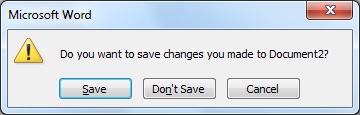
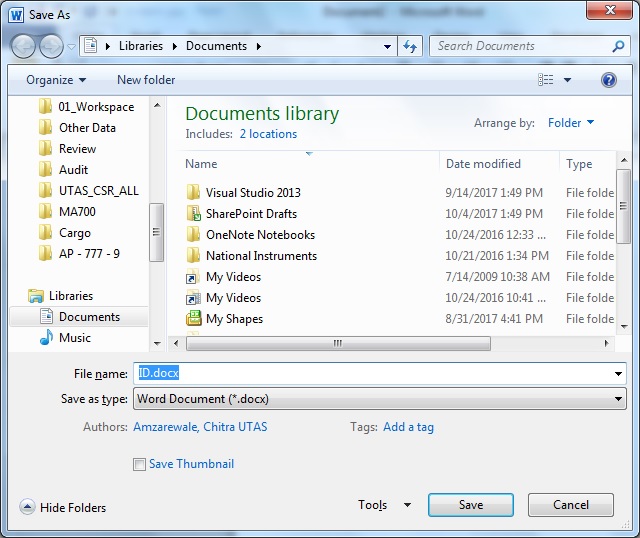
I am executing this after below lines doExport theDiag if (!null theDiag) destroy theDiag Now I am not getting error, i could resolve that but still it prompts me to save window where i need to click Save button. Is it possible to automate that? Attached are screen shots. Chitra Attachments Screen1.jpg Screen2.jpg |
Re: Saving exported DOORS Module It's working now. Thank you Chitra |